
Download Diy Notebook APK – DIY notebook, kids, students, teachers, creative, fun, easy, printable, paper, drawing, writing, coloring, templates, ideas, craft, inspiration
Overview
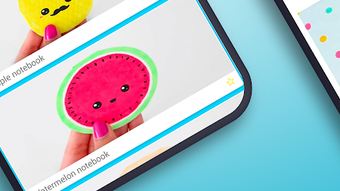
Diy Notebook APK is a free Android application developed by Modern Art, designed to inspire creativity and hands-on learning through the creation of personalized notebooks. Targeted primarily at children, students, and educators, the app provides a simple and engaging platform for crafting physical notebooks using digital templates. It supports a range of creative activities including drawing, writing, and coloring, making it ideal for classroom projects, home-based learning, or personal artistic expression. The app includes a selection of cute and appealing designs featuring animals and food themes, which can be used as backgrounds or decorative elements to enhance the visual appeal of handmade notebooks.
Users are guided through the process of creating a DIY notebook using basic materials such as blank paper, pens, pencils, and erasers. The app offers a step-by-step approach to help users organize their thoughts, plan their layouts, and apply creative touches like unique fonts and illustrations. While the app does not facilitate direct digital note-taking, it functions as a digital inspiration hub that bridges the gap between digital planning and physical crafting. This makes it especially useful for educators seeking to integrate creative exercises into their curriculum or parents looking for fun, educational activities for their children.
Key Features & Capabilities
- Creative Templates – Offers a variety of themed templates featuring animals and food, ideal for children and young learners to use as background designs or decorative elements.
- Printable Layouts – Provides ready-to-print designs that users can transfer to physical paper, supporting the creation of personalized notebooks and organizers.
- Design Customization – Allows users to add text with unique fonts and draw or color directly on templates, encouraging personal expression and creativity.
- Step-by-Step Guidance – Includes simple instructions on how to assemble a physical notebook using common materials like paper, pens, and binders.
- Educational Use Cases – Designed to support classroom activities, homework planning, and creative writing projects for students and teachers.
These features make the app a practical tool for turning digital ideas into tangible creations. For example, a teacher could use the app to generate themed notebook layouts for a unit on animals, which students then print and decorate. Similarly, a parent might use it to create a fun journal for their child’s daily drawings or school notes. The app’s focus on offline creativity ensures that users can enjoy the experience without requiring constant internet access, making it accessible in various environments.
User Interface, Workflow & Performance
The user interface of Diy Notebook APK is designed with simplicity and accessibility in mind, catering to younger users and those with limited technical experience. Navigation is straightforward, with a clean layout that prioritizes visual elements over text-heavy menus. Users can browse through available templates by theme, select one, and begin customizing it with text or drawings. The workflow follows a logical sequence: choose template → personalize design → prepare for printing → assemble physical notebook.
Performance details were not specified by the developer. However, based on the app’s lightweight nature and the fact that it operates primarily on static templates, it is expected to run smoothly on most Android devices. The app does not require significant processing power or memory, which suggests stable operation even on lower-end devices. The developer did not provide information on CPU or RAM usage, nor did they mention background processes or battery impact. Stability is likely high due to the app’s limited functionality and absence of real-time syncing or cloud features.
Compatibility & System Requirements
Diy Notebook APK is designed for Android devices and is compatible with the Android operating system. The app has a file size of 12.5 MB, indicating a lightweight installation that should not strain device storage. The version is listed as 1.0, suggesting it is in its initial release phase with potential for future updates. The developer did not specify minimum hardware requirements, such as RAM, processor speed, or screen resolution. Compatibility information was partially provided, with no mention of specific Android versions or device types.
Given the app’s size and function, it is likely to work on most modern Android smartphones and tablets. However, users should ensure their device supports the installation of APK files, which may require enabling “Unknown Sources” in the device settings. The app does not appear to require internet access for core functionality, allowing full use in offline environments.
Pros and Cons
Pros
- Free to download and use, making it accessible to a wide audience.
- Simple and intuitive interface suitable for children and beginners.
- Offers creative, printable templates with fun themes like animals and food.
- Encourages offline, hands-on learning and creative expression.
- Supports educational and personal use for students, teachers, and parents.
Cons
- Limited to Android platform; no support for iOS or desktop systems.
- No advanced editing tools or digital note-taking capabilities.
- Exact system requirements were not listed.
- Only one version (1.0) available; update frequency is unknown.
- Limited to printable content; no digital notebook export or sharing options.
FAQ Section
Is Diy Notebook APK safe to download and install?
The app is provided by Modern Art and is free to use. As with any APK file, users should ensure they download it from a trusted source to avoid potential security risks. It is recommended to scan the file with a trusted antivirus tool before installation.
Can I use Diy Notebook APK offline?
Yes, the app does not require an internet connection to access templates or customize designs. All core features can be used offline after installation.
Is the app available for iOS or Windows?
Currently, the app is only available for Android devices. There is no official version for iOS or desktop operating systems.
How often does the app receive updates?
The app is currently at version 1.0. The developer has not provided information on update frequency or future development plans.
What kind of materials do I need to make a physical notebook using this app?
You will need blank paper, a pen or pencil, an eraser, and optionally a binder or glue. The app provides printable templates that can be used as a guide for assembling the notebook.
Final Thoughts + CTA
Diy Notebook APK stands out as a lightweight, creative tool that successfully bridges digital planning with physical crafting. It is particularly well-suited for children, students, and educators seeking fun, educational, and hands-on activities. While it lacks advanced features and cross-platform availability, its simplicity, affordability, and focus on inspiration make it a valuable resource for those interested in DIY projects and creative learning. The app delivers on its promise of easy-to-use templates and practical guidance, without unnecessary complexity.
For anyone looking to spark creativity, organize thoughts, or create a personalized notebook with a fun twist, this app offers a straightforward and enjoyable experience. Download Diy Notebook APK now and start crafting your own creative masterpiece today.




.png)


